
How visitor pre-registration works at Singapore offices and industrial sites: what to collect, PDPA limits on NRIC and retention, QR check-in, and exception handling.
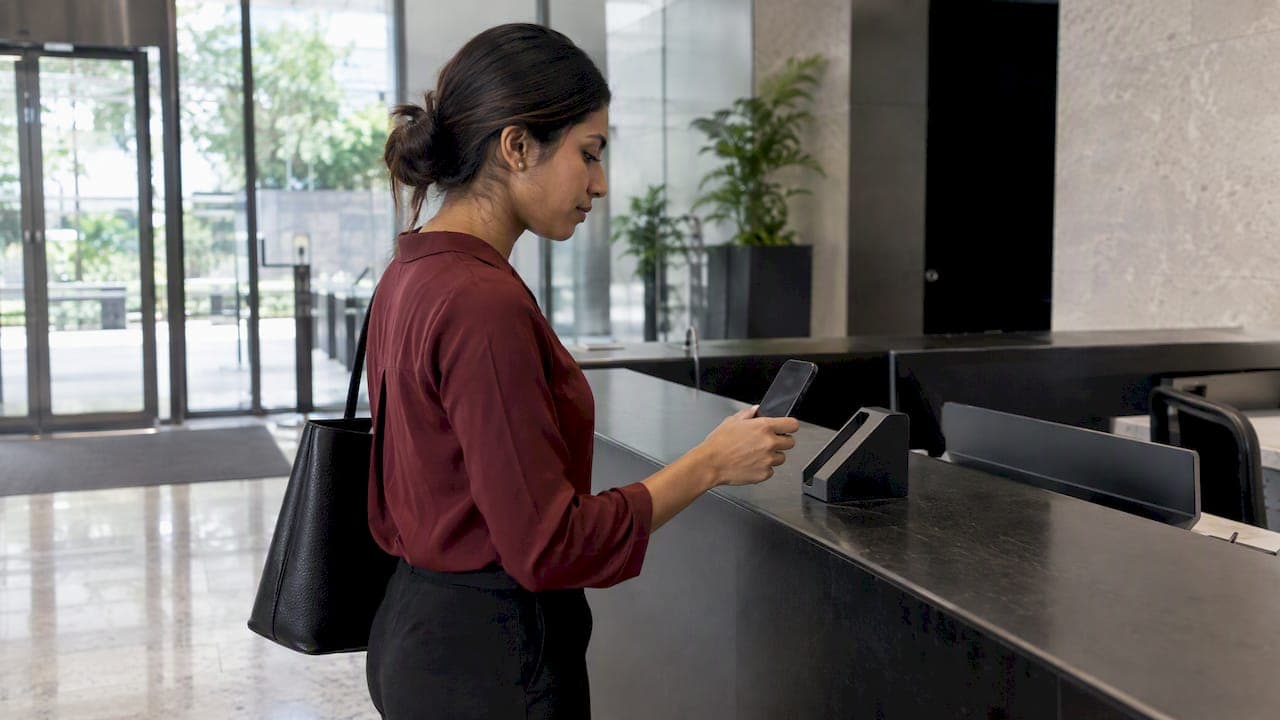
Visitor Pre-Registration: A Practical Guide for Singapore Sites

Visitor pre-registration means the host records a visit before the guest arrives, so the guard or kiosk finds an approved entry instead of starting from a blank form. The visitor gets an invitation, usually with a QR code, and check-in at the gate takes seconds. For Singapore offices, industrial sites and other controlled facilities, it is also a security control: identity is captured, checked and tied to a host before anyone reaches the turnstile.
This guide covers what pre-registration is, what to collect and what to leave out under the PDPA, how QR check-in works, how to design it across zones, and what staff do when a visitor does not fit the plan.
TL;DR
- Pre-registration moves data entry and approval to before arrival. The gate only confirms who turns up.
- Collect the minimum. Under the PDPA, organizations generally should not collect NRIC numbers unless the law requires it or high-fidelity identity verification is necessary.
- Treat visitor management as access control, not a reception convenience: tie each invitation to a host, a zone and a time window.
- Plan exceptions on day one: walk-ins, early arrivals and visitors who cannot scan a code.
- Set a retention period and enforce it automatically.
Table of Contents
- What visitor pre-registration is, and how it differs from registering on arrival
- Why it matters for security, not just speed
- What to collect in advance
- Protecting the data under the PDPA
- How a visitor checks in with a QR invitation
- Designing pre-registration across offices, industrial sites and controlled facilities
- Handling the visitors who do not fit the plan
- Rollout checklist
- Our perspective: pre-registration is the front door of an exception-based model
- How BeyondVisitor fits
- FAQ
- Sources
What visitor pre-registration is, and how it differs from registering on arrival
In a traditional flow, the visitor reaches reception, writes a name, a company and a host on a paper log or kiosk, and the guard phones the host to confirm. Every step happens while the visitor waits, and the guard has no way to tell an expected contractor from a stranger with a plausible story.
Pre-registration reverses the order:
- The host creates the visit: visitor name, email or mobile number, date, time window and purpose.
- The system sends an invitation, typically by email or message, carrying a QR code that works as a one-time pass.
- At the site, the visitor scans the code. The system finds the record, confirms the details and notifies the host.
- The visitor is issued a pass limited to the zones and hours approved.
The practical differences are speed, accuracy and control. Typed-in details are replaced by details the visitor entered themselves, which cuts transcription errors. Screening can happen before the visitor is on site. And the guard sees an approved list rather than a request.
Why it matters for security, not just speed
The regulator-facing view in Singapore treats visitor management as part of the security objective. IMDA's pre-approval guide describes automated visitor management as controlling facility access through digital registration, capturing visitor information, issuing passes and integrating with access control to keep entry secure while streamlining check-in.
That framing is useful when you justify the project internally. Faster lobbies are a benefit, but the stronger case is that every person on site has a name, a host, a purpose and a recorded entry and exit. When something goes wrong, you can answer who was where, and when.
Singapore's Police Force guidance points the same way. Its Annex on security measures says to apply security zoning to control movement, keep visitors out of areas where they have no business, reduce congestion and help employees spot unauthorized persons. The same document names visitor-management systems and self-registration kiosks among access-control measures, next to card readers and turnstiles.
Security contracts reflect this too. The SPF's outcome-based contract template expects contractors to record key visitor and contractor details, including entry and exit records, available for management review at any time. A pre-registration system produces those records as a by-product, rather than relying on handwriting.
What to collect in advance
The temptation is to ask for everything at invitation stage. Resist it. Each field you collect is something you must secure, justify and eventually delete.
Fields most sites need
| Field | Who enters it | Why |
|---|---|---|
| Visitor name | Host or visitor | Matches the person to the record |
| Mobile number or email | Host | Delivers the invitation and reaches the visitor if plans change |
| Company | Visitor | Context for the guard and host |
| Host and department | Host | Approval and escort accountability |
| Date and time window | Host | Limits when the code is valid |
| Purpose of visit | Host | Drives zone access and pass type |
| Vehicle plate | Visitor, if parking | Needed only for sites with vehicle entry |
| Photo | Visitor, at the gate | Printed on the pass and stored with the record |
A useful pattern is to capture the photo at the gate rather than in advance. The invitation then carries less sensitive data, and the photo is taken of the person actually standing there.
One Singapore example of a lean approach: the kiosk at Capital Square collects visitors' names and contact numbers, encrypts data in transit with TLS 1.2, and keeps visitor data for 30 days. That is one building's policy, not a legal requirement, but it shows how little a working multi-tenant building needs.
NRIC numbers: the field to leave out
Many Singapore sites still ask for a full NRIC number out of habit. PDPC's advisory guidelines say organizations generally must not collect NRIC numbers unless required by law or necessary to establish or verify identity to a high degree of fidelity, and that any NRIC numbers you do collect need greater security.
For a routine office meeting, a name, a contact number and a host confirmation establish who is coming. Reserve identity-document checks for higher-risk contexts, such as regulated or sensitive areas, and document why. If a particular zone does require stronger verification, state this in the invitation so the visitor is not surprised at the gate.
Protecting the data under the PDPA
Three practical habits follow from the PDPC guidance.
Tell visitors what you collect and why. The invitation email or the check-in page should say, in a sentence or two, what is collected, for which purpose (site security and safety) and how long it is kept.
Limit access to the register. Hosts should see their own visitors. Security and front-desk teams see the live list. Full history sits with a small group. Our guide to role-based access control shows how to set this up for security teams.
Delete on schedule. The PDPA's Retention Limitation obligation requires organizations to stop retaining personal data, or remove the means of association, once it is no longer needed for the purpose it was collected or for legal or business reasons, as set out in the same PDPC guidelines. The PDPA sets no fixed number of days. Decide your own period, record the reason, and let the system purge automatically rather than relying on someone to remember. Thirty days, as in the Capital Square example above, is one defensible choice for ordinary visits. Sites with contractor safety or audit obligations may justify longer.
If your camera system captures visitors as well, the same discipline applies to footage. See our notes on privacy masking for CCTV and video redaction before auto-overwrite.

How a visitor checks in with a QR invitation
The visitor's side should take under a minute and need no app download.
- Invitation arrives by email or message with the site address, arrival window, entrance instructions and the QR code.
- Visitor completes any missing details through a short web form, if the host has asked for them.
- At the gate or kiosk, the visitor scans the code. The system matches the record, checks that the time window is valid, and marks the visitor as arrived.
- Verification step. Depending on the site, this is a photo, a watchlist check, or a guard comparing the person against the approved record.
- Pass issued with zone and time limits. The host receives a notification.
- Check-out by scanning the code again or returning the pass, so the record shows who is still on site.
QR-based verification is a familiar pattern in Singapore's digital ecosystem. GovTech announced plans for SG-Verify, a facility for businesses to perform secure identity verification and data transfer through QR scanning. Visitors are therefore used to scanning a code to prove who they are.
If your policy includes screening against internal lists, do it at step 4 rather than at the desk with a queue behind. We cover that sequence in our piece on visitor watchlist screening.
Designing pre-registration across offices, industrial sites and controlled facilities
One template rarely fits every location. Build it around zones.
Start from the zoning plan
List the areas on each site: lobby, meeting floors, loading bays, plant rooms, server rooms, construction or hazardous areas. Assign each an access level, in line with the SPF's call to define zone restrictions and access levels. Then define visit types that map to those zones, for example:
- Meeting guest: lobby and named meeting floor, escorted or card-limited.
- Contractor: specific work area, time-boxed, with safety induction recorded.
- Delivery: loading bay only, no building access.
- VIP or regulator: broader access, prior approval from a named senior host.
The host picks a visit type, and the zones follow. Hosts should not be assembling permissions from scratch.
Offices and multi-tenant buildings
Tenants need to invite visitors without exposing other tenants' lists. Building management needs a unified view for security. Keep a single lobby check-in with tenant-specific host approval, and integrate with turnstiles or lift controls so the pass only opens what the visit permits.
Industrial and high-risk sites
Here pre-registration links with safety. Contractors may need proof of training before the system issues a code, and work often needs a permit. Our guide to digital permit to work in Singapore explains how to connect the two so a visitor with a code but no permit does not get past the gate. Where the site has operational technology on the premises, keep visitor systems on a separate network segment, as covered in our OT network segmentation guide.
Beyond the gate
Once a visitor is inside, geofencing alerts can flag a pass holder who strays outside approved areas. Staff awareness still matters: MOM's workplace security guidance lists suspicious behavior to watch for, such as unauthorized photographs of security features, loitering, or attempts to hide identity. Pre-registration gives staff a clear baseline: anyone not on the list or outside their zone stands out.
Handling the visitors who do not fit the plan
A process that only works for perfect visits fails by Tuesday lunchtime. Write down what staff do in each of these cases and train them.
The visitor was not pre-registered. Do not wave them through and do not turn them away blindly. The guard contacts the host through the system, the host creates the visit on the spot or the guard does so on the host's confirmation, and the visitor then follows the normal scan and verification path. Log it as a walk-in so you can see the pattern. A host who produces many walk-ins needs a reminder, not a workaround.
The visitor arrives early. The code should be valid for a window, for example 15 to 30 minutes before the start time, and not for the whole day. If someone arrives outside the window, the guard notifies the host, who either extends the visit or asks the visitor to wait in the lobby only.
The visitor cannot use the code. Reasons include no phone signal, a dead battery, a deleted email, or limited digital comfort. Allow a lookup by name and host at the desk, with the same verification step. The outcome should be the same record, the same pass and the same zones as a scan.
The visitor's details do not match. If the person at the gate is not the person invited, treat it as a new visit that needs host approval. A forwarded code must never be a valid substitute for identity.
The host cannot be reached. Define a fallback approver, such as a delegate or the department assistant, and a rule that unconfirmed visitors wait in the lobby.
Each exception should leave a trace in the register. That trace is what lets management review entry and exit records on demand, as the SPF's contracting expectations anticipate.
Rollout checklist
- Map zones and visit types for each site.
- Decide the field list. Remove NRIC unless you can justify it.
- Write the privacy notice and the retention period.
- Configure host approval and fallback approvers.
- Connect to turnstiles, lifts or door controllers if you want passes to enforce access.
- Pilot at one entrance, review the walk-in rate and scan failures, then expand.
- Brief guards and receptionists on the exception rules above.
- Review reports monthly: walk-ins, overstays, unreturned passes.
If you are comparing options for the surrounding stack, our physical security tools comparison for Singapore facilities lays out the categories.
Our perspective: pre-registration is the front door of an exception-based model
Most sites we speak to start by asking how to shorten the queue. We think that is the second question. The first is what the guard should be looking at.
When visits are registered in advance, the system already knows who is expected, where they may go and when. Everything that matches stays quiet. What deserves attention is the exception: the unannounced arrival, the code used twice, the pass holder in the wrong zone, the visitor still on site after hours. That is exception-based monitoring, and it lets a small team cover a large site without staring at every screen. AI never blinks, but it is only useful when it has a defined baseline to compare against, and a pre-registered visit is that baseline.
We also advise clients to resist collecting more than they can protect. A lean invitation, a photo at the gate and automatic deletion beat a long form that becomes a liability. And visitor data should not sit alone: it belongs in the same picture as access control, video analytics and patrol records, so an incident reads as one narrative and not four separate logs.
— Eumir
How BeyondVisitor fits
BeyondVisitor is our automated visitor management product for organizations that want pre-registration, check-in and visitor records in one flow, designed to sit alongside the rest of the security stack. Because we integrate multi-vendor technology and validate deployments for regional requirements, it can be planned around your existing gates, readers and zoning, not around a blank slate.

If you want to see how it would map to your sites, start with the BeyondVisitor page, or talk to us about solution integration if the project spans several systems or buildings.
FAQ
Is visitor pre-registration mandatory in Singapore?
We found no general rule requiring it for every premises. What the SPF guidance does is expect visitor and contractor records, including entry and exit, to be available for management review in security contracts, and it lists visitor-management systems among access-control measures. Pre-registration is the most reliable way to meet that expectation. Check your own contract, lease and sector requirements for specifics.
Can I ask visitors for their NRIC number?
Only in limited cases. PDPC's guidelines say organizations generally must not collect NRIC numbers unless the law requires it or it is necessary to verify identity to a high degree of fidelity. For most meetings, a name and contact number are enough. If you do collect NRIC numbers, protect them to a higher standard.
How long should we keep visitor records?
The PDPA sets no fixed period. It requires you to stop retaining personal data once it is no longer needed for its purpose or for legal or business reasons. Some Singapore buildings use 30 days. Choose a period you can justify, document it and automate deletion.
What if a visitor forgets or cannot open the QR code?
Look the visitor up by name and host at the desk, then apply the same verification and pass rules as a scan. The record and zone limits should be identical. Never let a forwarded or screenshotted code stand in for identity checks.
Sources
- Automated Visitor Management, IMDA Pre-Approval ICM Vendor Guide
- Guide for Responsible Person Annex E, Singapore Police Force
- Outcome-Based Contract Template, Singapore Police Force
- Advisory Guidelines on the PDPA for NRIC Numbers, PDPC
- Capital Square visitor FAQ, Office Onboard
- GovTech: More Citizens and Businesses Satisfied with Government Digital Services
- Prepare your workforce, Ministry of Manpower
Recommended
Read More Articles
Line of Sight Survey: Methods, Tools and Site Checks
What a line of sight survey is, how surveyors and GIS analysts run one, and how to record results for CCTV, wireless and sensor deployments in Singapore.

Single Sign-On Security: Risks, Controls and a Checklist
Is single sign-on secure? See how SSO works, where it fails, and the MFA, key protection and monitoring controls Singapore security teams should require.
Fiber Optic Perimeter Security: How It Works and When to Use It
How fiber optic perimeter security detects and locates intruders, where it beats microwave sensors, and how to pilot it on a Singapore site.

Heatmap Analytics for Physical Security and Facilities
How heatmap analytics and footfall heatmaps work in buildings, how to read them, what limits their accuracy, and what Singapore's PDPA means for deployment.
Let's Build YourSecurity Ecosystem.
Whether you're a System Integrator, Solution Provider, or an End-User looking for trusted advisory, our team is ready to help you navigate the BeyondSensor landscape.
Direct Advisory
Connect with our regional experts for tailored solutioning.