
How PTZ auto tracking works, where it helps, where it misses, and what to check for site, network and VMS integration before deploying it in Singapore.
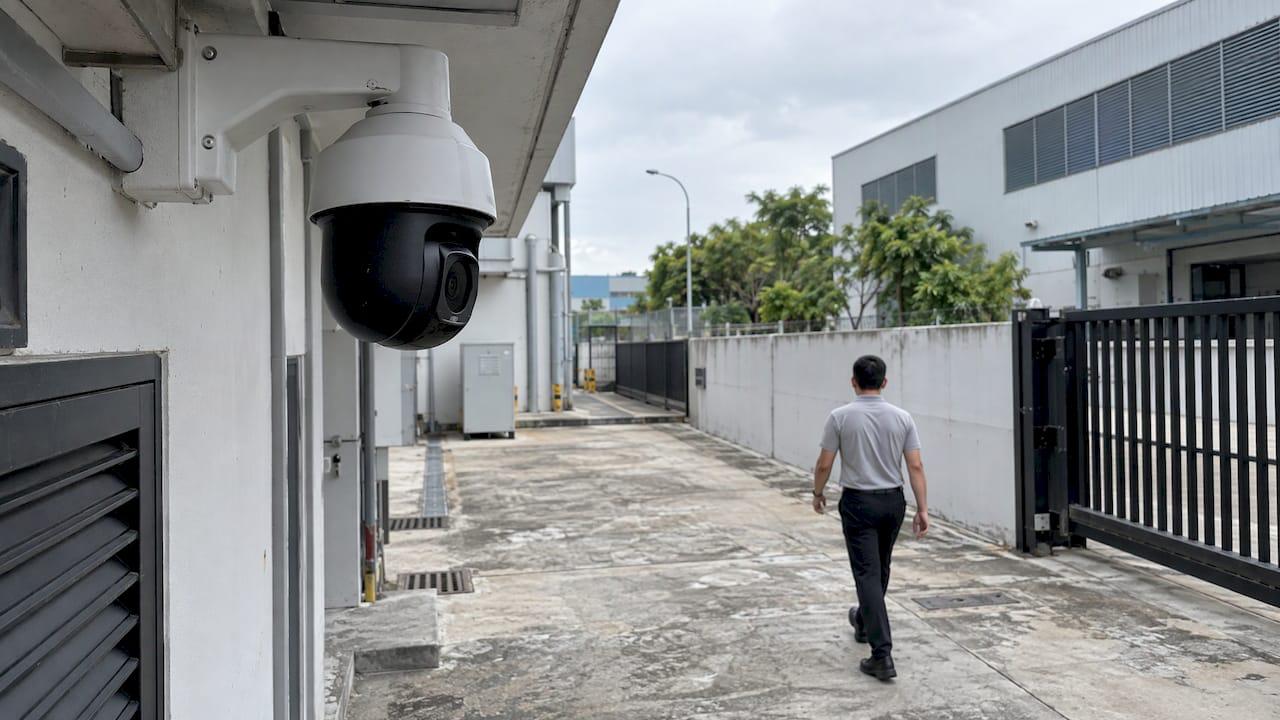
PTZ Auto Tracking for Security: Deployment Guide for Singapore

PTZ auto tracking lets a pan-tilt-zoom camera lock onto a moving person or vehicle and follow it without an operator. In a security setting, it works best as one part of an exception-based system: analytics decide what deserves attention, the PTZ follows it, and the control room verifies it. Used as a standalone camera feature, it tends to lose targets. Used inside a validated, integrated design, it turns a single camera into a reliable way to keep a subject in view from first alert to response.
This guide is for security managers, facility owners and integrators who need to decide where auto tracking belongs on a Singapore site, what to check before installation, and how to keep missed and false tracks down.
TL;DR
- Auto tracking is a PTZ camera that follows a detected target by steering pan, tilt and zoom automatically, typically after an analytics rule such as a tripwire or intrusion zone fires.
- Best fits: perimeters, car parks, loading bays, yards and open industrial areas where one camera must cover a wide area and a person should be followed once they trigger an event.
- Poorer fits: entrances and exits, crowded scenes and places with heavy occlusion. The Singapore Police Force (SPF) VSS Standard also cautions about PTZ cameras at ingress and egress points.
- Network and integration decide the result: ONVIF compliance, bandwidth for concurrent feeds, a return-to-home setting and a clean alarm-to-camera link to your VMS.
- Validate on your own site with a short pilot before you scale.
Table of Contents
- What PTZ auto tracking is
- How a camera decides what to follow
- Single-camera and dual-camera tracking
- Where PTZ auto tracking helps in Singapore
- What to check before you deploy
- Integrating tracking with your VMS, alarms and access control
- Limitations and how to reduce missed or false tracks
- A practical deployment sequence
- Perspective
- How BeyondSensor supports tracking deployments
- FAQ
- Sources
What PTZ auto tracking is
A PTZ camera can pan (turn left and right), tilt (move up and down) and zoom (change the field of view). Normally an operator drives it with a joystick or a software control. Auto tracking replaces the joystick with software. The camera, or an analytics server connected to it, detects a moving object, calculates where it is heading and sends pan, tilt and zoom commands so the object stays near the centre of the frame at a useful size.
That is different from a preset tour, where the camera visits fixed positions on a timer, and from a fixed camera with digital zoom, which never changes its physical view. Tracking is reactive: it begins only when something qualifies as a target.

For a security operation, the value is straightforward. A person walking along a fence line, crossing a yard or moving between vehicles is a poor fit for a fixed camera, because the subject leaves the frame or becomes too small to identify. A guard staring at a wall of screens will not reliably follow that subject either. Software that never gets distracted can.
How a camera decides what to follow
Most deployments use one of three trigger approaches, and the differences matter when you plan a site.
Rule-triggered tracking
The camera or analytics engine watches for a rule: a line crossing, an intrusion into a defined zone, loitering or an abandoned object. When the rule fires, the PTZ takes control and follows the object that triggered it. This is the most common pattern in professional security because it ties tracking to an event the security team has already defined as meaningful. It also limits false activations, since leaves, shadows and headlights should not satisfy a rule that requires a person or vehicle class.
If you are building these rules, see our explainers on line crossing detection and virtual tripwires and intrusion detection analytics.
Motion-based tracking
The simplest mode follows whatever moves. It is easy to enable but easy to fool: wind-blown vegetation, rain, insects near the lens at night, reflections and a passing vehicle all look like motion. On a busy site it produces a camera that constantly chases the wrong thing.
AI object-class tracking
Here a deep-learning model classifies the target as a person, vehicle or other class and follows only the classes you choose. It handles most nuisance motion and it can keep following a person who stops and starts. It needs enough pixels on the target to classify reliably, which is why zoom level, mounting height and lighting are design inputs, not afterthoughts.
Single-camera and dual-camera tracking
There are two common architectures.
| Approach | How it works | Where it fits | Main watch-out |
|---|---|---|---|
| Single PTZ | The same camera detects and follows the target | Small areas, simple scenes | While zoomed in, it cannot see anything else in the area |
| Fixed wide camera plus PTZ | A fixed camera detects and maps the target; the PTZ is steered to it | Perimeters, yards, large open areas | Calibration between the two views, and a short delay before the PTZ lands on the target |
| Multiple fixed cameras plus PTZ handoff | Analytics on several cameras decide which view or PTZ should take over | Campuses, long fence lines | Needs consistent integration across vendors and good site planning |
The single-PTZ design has a structural weakness: once the camera zooms in on one person, it loses awareness of everyone else. A second person entering the scene may go unnoticed. That is why a fixed wide-angle view paired with a PTZ is usually the better design for anything beyond a small area. The fixed camera keeps the whole picture while the PTZ gives the close-up.
Where PTZ auto tracking helps in Singapore
Singapore sites tend to be dense, regulated and heavily monitored, so the question is less about whether to add tracking and more about where it earns its place.
- Perimeters and fence lines. Industrial estates, utilities, data centres and logistics hubs often have long boundaries. A rule-based tripwire or intrusion zone cues the PTZ to follow the person along the boundary until a response team arrives.
- Car parks and vehicle yards. Open areas with limited foot traffic suit tracking, particularly after hours when any person on foot is an exception.
- Loading bays and container yards. A PTZ can follow a person between vehicles and stacks, which a fixed camera cannot do from one angle.
- Rooftops and podium decks. Restricted areas where any presence is an event. Our write-up on loitering detection analytics covers a two-week pilot approach for this kind of zone.
- Residential and commercial common areas. Open plazas and perimeters, with tracking limited to after-hours rules so it is not chasing residents during the day.
For entrances and exits, think carefully. The reasoning is in the next section.
What to check before you deploy
Most disappointing auto-tracking deployments fail before the first alarm, at the design stage. Work through these factors.
Site and camera placement
Ingress and egress points. The SPF's VSS Standard for Buildings states that PTZ cameras may not be suitable for ingress and egress points because they can be steered away from the intended coverage. A gate or lobby door needs guaranteed identification coverage at all times. Use fixed cameras there, and let a PTZ cover the area beyond.
Home position and presets. The same standard says PTZ cameras should support preset locations, routine patterns and dwell times where necessary, a default-settings function that returns the camera to its original position after a set duration, and fast pan and tilt for catching fast-moving targets when suspicious activity is detected. In practice, that means every auto-tracking PTZ needs a defined home view and a sensible timeout. Without them, a camera that finished chasing a delivery rider may sit pointing at a wall all night.
Mounting height and distance. Tracking performance depends on how many pixels fall on a person. Set the maximum distance at which a person is still classifiable, and place cameras so the area you care about sits inside that range. A camera mounted directly above the path of travel has a blind cone beneath it, so favour an angled approach.
Lighting and weather. Low light reduces classification confidence, and rain, glare from wet surfaces and headlights increase false triggers. Check performance at night and in heavy rain, not only in the afternoon of the site survey. Singapore's frequent heavy showers make this a standard test case, not an edge case.
Occlusion and scene clutter. Parked vehicles, pillars, hoardings and foliage break a track. After an occlusion, the tracker must either re-acquire the same person or start a new track. Mark the areas where occlusion is likely and add overlapping coverage.

Network and bandwidth
Tracking increases load in ways a fixed-camera design does not. A zoomed, moving PTZ produces a more complex image, and analytics often run on the stream in parallel with recording and display. The SPF standard requires the network to have sufficient bandwidth for the maximum number of concurrent feeds for recording, display and video analytics, with at least 20% spare capacity for future expansion. Size to peak concurrency, which is when several alarms fire at once, not to the average.
Server capacity matters as much as the network. If analytics run centrally, plan GPU or compute headroom for the number of simultaneous tracks. Our server rack space planner helps you work through the physical side of that before procurement.
Integrating tracking with your VMS, alarms and access control
A PTZ that tracks well but never tells anyone is a camera that records an incident nobody sees. Integration turns tracking into an operational workflow.
The SPF standard describes the target behaviour for new systems: CCTV can be integrated with IP security systems such as video analytics, intrusion detection and access control, so that when an alarm triggers the system notifies security officers, shows the alarm location on a site plan and displays the specified camera view for verification. A tracking PTZ is the natural camera to display in that moment, because the operator sees the person live and in close-up, not a wide shot of an empty scene.
The same document sets the interoperability baseline:
- IP-based video surveillance should comply with ONVIF or equivalent, so devices from different vendors can work together.
- The integrator should provide an SDK supporting the Select camera, View, Extract, PTZ and Playback commands.
- The system should keep at least 20% spare capacity for expansion.
Those points come from the SPF VSS Standard for Buildings and are worth treating as a design checklist even where the standard is not formally binding on your site.
In practice, check four handoffs:
- Analytics to PTZ. Which event cues which camera, and how fast. Define the priority when two events compete for one PTZ.
- PTZ to VMS. The alarm should open the right live view and bookmark the recording, so playback starts at the trigger and not at the end of the incident.
- VMS to operators. Alarm text, site-plan location and camera view should arrive together. Our guide to secure video wall design for control rooms covers how to present these views without overloading the operator.
- Auxiliary systems. Access control, intrusion panels and tailgating alerts. See how this works in tailgating detection with ACS and SOC integration.
Limitations and how to reduce missed or false tracks
Auto tracking is a force multiplier, not an autonomous guard. Knowing the failure modes lets you design around them.
| Failure mode | Typical cause | Design response |
|---|---|---|
| Target lost after occlusion | Pillars, vehicles, foliage | Overlapping fields of view; fixed camera supervising the scene |
| Camera follows the wrong object | Motion-only triggers, reflections | Use rule-based or class-based triggers; restrict to person and vehicle |
| Second intruder missed | Single PTZ zoomed on the first target | Pair with a fixed wide camera |
| Camera never returns | No home position or timeout | Configure default-settings reset and dwell times |
| Target too small to classify | Distance, low light | Verify pixels-on-target at the farthest point; add lighting |
| Delay at the start of a track | PTZ must rotate to the target | Choose fast pan and tilt, and use presets near high-risk zones |
| Night-time nuisance triggers | Insects, headlights, rain | Tune sensitivity per zone and per time of day |
Three practices cut most of these problems.
Tune per zone, not per site. A single global sensitivity setting is always wrong somewhere. Set separate rules, schedules and object classes for each area.
Keep a human in the loop for decisions. Tracking provides the view. A trained operator decides whether it is a response event. This is how exception-based monitoring should work: the system filters, the person judges.
Maintain the hardware. Motorised mechanics wear. Lens contamination, loose mounts and drifting presets slowly erode tracking accuracy. Our preventive maintenance guide for CCTV in Singapore outlines a routine that keeps PTZs aligned and clean.
A practical deployment sequence
- Define the incident. Write down what the system must catch, for example a person entering a fenced yard after 10 pm, and what the response is.
- Walk the site. Map blind spots, lighting, occlusions and the distance to the farthest target position.
- Choose the architecture. Fixed wide plus PTZ for open areas; fixed cameras only for gates and doors.
- Confirm interoperability. Check ONVIF compliance and the available commands for PTZ control, and agree how the alarm reaches the VMS.
- Size the network and compute. Plan for peak concurrent feeds plus 20% spare.
- Run a short pilot. Test on the real site, at night and in rain, and record the hit rate and false alarm count per zone.
- Tune, document and train. Set home positions, timeouts and schedules, and train operators on what a track means and when to take manual control.
- Review on a schedule. Re-check presets and sensitivity as the site changes, for example after new construction or landscaping.
Step 6 is where most projects are won or lost. A pilot with defined success measures replaces opinion with data. Our two-week pilot for loitering detection analytics shows the format.
Perspective
We approach PTZ auto tracking as a system problem, not a camera feature. The camera is the easy part. The hard parts are deciding which events deserve a track, getting that event to the right view in the control room, and making the whole chain work across the mix of vendors that real Southeast Asian sites inherit.
That is why our platform is built around exception-based monitoring and multi-vendor integration. Analytics decide what matters, video analytics and unified security operation dashboards bring the right view to the operator, and the same chain can serve patrols, visitors and perimeter events. AI never blinks, and that is exactly what a tracking workflow needs, provided it sits inside a design that has been validated on your own site.
Our teams work from Singapore, Malaysia and the Philippines, with offices planned in Thailand and Vietnam, so localised technical validation is part of how we deploy. We would rather prove a tracking design in a short pilot on your perimeter than promise a result on a datasheet.
Eumir
How BeyondSensor supports tracking deployments
We provide AI-powered surveillance software, video analytics dashboards and unified security operation dashboards, and we integrate multi-vendor technology, so tracking rules, cameras and the control room work as one system. For integrators who want to plan and deliver these projects, Solution Integration is where to start. For video analytics and monitoring on live sites, see BeyondWatch, and for patrol automation with Vision Language Models, see BeyondPatrol.
If you are scoping a perimeter or yard and want a validated design before you commit, talk to us through the BeyondSensor site.
FAQ
Is PTZ auto tracking the same as motion detection?
No. Motion detection only flags that pixels changed. Auto tracking uses a detected target, and often an object class or an analytics rule, to steer the camera continuously. Rule- and class-based triggers are far less prone to nuisance activations than raw motion.
Can one PTZ camera track several people at once?
Not well. A zoomed PTZ can follow only one view at a time. For several subjects, pair it with a fixed wide-angle camera that keeps the whole scene, and set a priority rule for which target the PTZ follows.
Should I use auto tracking at gates and entrances?
Use fixed cameras for identification at entrances and exits. The SPF VSS Standard notes that PTZ cameras may not suit these points, because they can be moved away from the intended coverage. Let a PTZ cover the approach and surrounding area instead.
What should a VMS integration support?
It should work with ONVIF or equivalent and give operators commands to select a camera, view, extract, control PTZ and play back. It should also show the alarm location on a site plan with the relevant camera view, so the operator can verify quickly.
Sources
Recommended
Read More Articles
CCTV Tender Specifications in Singapore: What to Write and Check
How to write or answer a CCTV tender specification in Singapore: camera, retention, network, analytics and acceptance requirements, with SPF, MOM, IMDA and PUB figures.
Alarm Deduplication for Security Teams: A Practical Guide
How alarm deduplication, correlation rules, severity mapping and escalation matrices work together to cut duplicate alarms without hiding the ones that matter.
Vehicle Classification Analytics: A Guide for Singapore Sites
How vehicle classification analytics and vehicle type detection work, which classes to use in Singapore, and how to plan camera placement, integration and data.
Evacuation Muster Reporting: Singapore Site Guide
How to run evacuation muster reporting and roll call on Singapore sites: who counts whom, what the report records, SCDF duties, and how to close the gaps.
Let's Build YourSecurity Ecosystem.
Whether you're a System Integrator, Solution Provider, or an End-User looking for trusted advisory, our team is ready to help you navigate the BeyondSensor landscape.
Direct Advisory
Connect with our regional experts for tailored solutioning.