
A practical preventive maintenance plan for CCTV in Singapore: checklist, inspection rhythm, SPF-aligned SLA terms, fault logging and what to put in a contract.
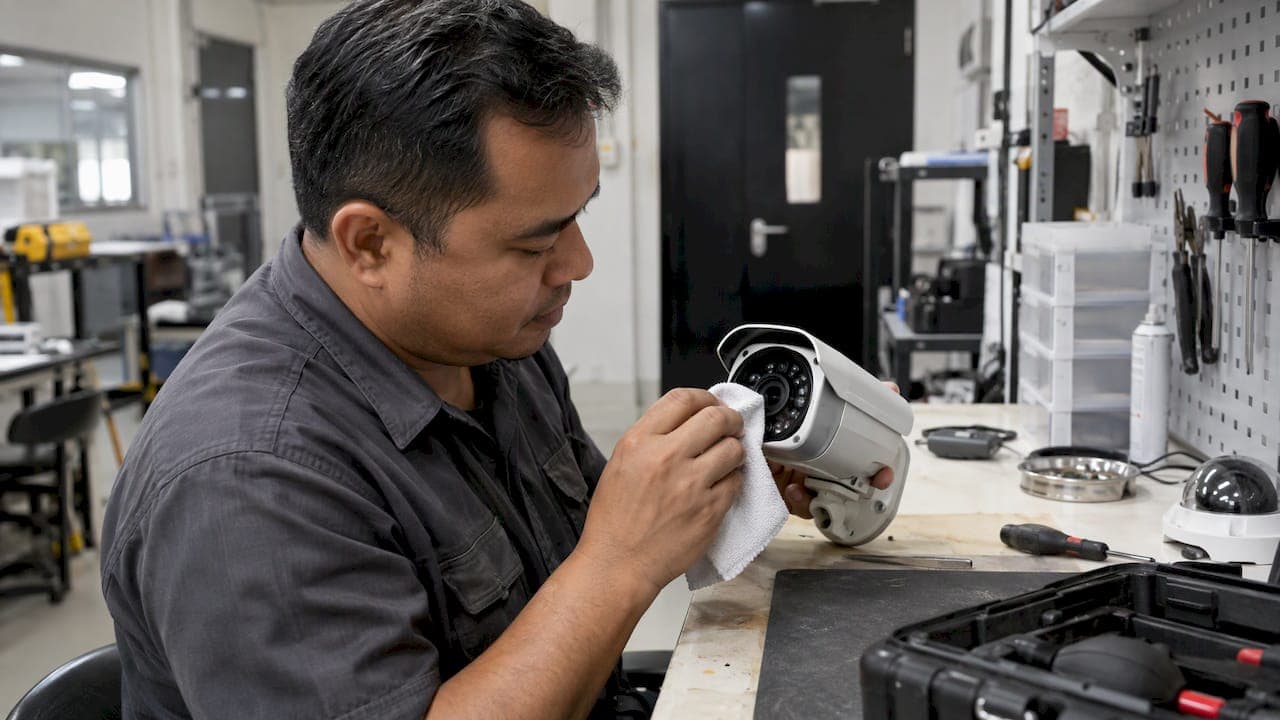
Preventive Maintenance for CCTV: A Singapore Guide

Preventive maintenance for CCTV means inspecting, cleaning, testing and updating a system on a fixed schedule, before a fault takes a camera or recorder offline. In Singapore, the Workplace Safety and Health Council guide on video surveillance systems names lens cleaning and replacement of worn mechanical parts as the core tasks. Their purpose is to keep the system operational, prevent sudden failure and minimize downtime. This guide gives you the checklist, the rhythm, the SLA terms to ask for and the records that prove the work was done.
TL;DR
- Preventive maintenance is scheduled work: clean, inspect, test, update and record. It is not a reaction to a dead camera.
- The SPF VSS Standard for Buildings sets 95% system availability over 12 months and expects faults to be rectified within 24 hours, or sooner when coverage is seriously lost.
- Build the plan around five layers: cameras, cabling and power, recording and storage, network and firmware, and evidence of audits.
- Write the schedule, response times and reporting into the maintenance contract, and keep a fault log that a security manager can audit.
- Exception-based monitoring can flag a degraded camera before the next scheduled visit.
Table of Contents
- What preventive maintenance covers
- Who is responsible in Singapore
- A CCTV maintenance checklist you can use
- How often to inspect and service
- Testing performance and documenting faults
- What to put in a CCTV maintenance SLA
- From scheduled checks to exception-based monitoring
- Where BeyondSensor fits
- Common mistakes to avoid
- FAQ
- Sources
What preventive maintenance covers
The WSH guide describes preventive maintenance as checking and cleaning camera lenses and replacing mechanical parts that show wear and tear. The aim is to keep the system running with little downtime and to extend equipment life. That is the minimum. A working plan also covers the parts that fail quietly: power supplies, storage, time settings and software.
The distinction from corrective maintenance matters for budgeting and for accountability. Corrective work starts after a failure and usually after an incident has already gone unrecorded. Preventive work starts from a calendar and a checklist, and it produces a record. In a building covered by the SPF standard, that record is also part of how the security manager shows the system is under control.

Who is responsible in Singapore
The SPF VSS Standard for Buildings (March 2022) places responsibility for proper VSS implementation on the building's Security Manager, including regular audits. Those audits check that storage duration, alarms and image quality meet the established standards, and any deterioration is to be rectified immediately.
In practice this means a maintenance vendor can do the work, but the building cannot hand off accountability. Facility managers and security directors should know the schedule, read the reports and challenge gaps. If your vendor is a system integrator, agree up front who signs off each visit.
A CCTV maintenance checklist you can use
Use this as a base and adjust it for your site's camera types, recorder platform and risk level. Each line should end in a pass, a fail or a note, with a date and a name.
Cameras and housings
- Clean the lens and dome. Dust, spider webs, water spots and film from air-conditioning exhaust degrade image quality long before a camera stops working.
- Check for obstructions: new signage, growing foliage, repositioned fixtures or stacked goods in a field of view.
- Confirm the field of view still matches the original design. Knocked or vibrated mounts drift.
- Inspect housings, seals, brackets and screws for corrosion, cracks and water ingress.
- For PTZ units, run the full movement range and presets and listen for wear in the motor.
- Check infrared illuminators and night-mode switching. Night image quality is where aging cameras fail first. Our guide to vertical-lux lighting specifications for CCTV explains why scene lighting belongs in the same review.
Cabling, power and connections
- Inspect visible cabling, conduits and junction boxes for damage, rodent chewing and loose terminations.
- Test PoE switch ports and power supplies. Check UPS battery health and runtime where the system is on backup power.
- Look for heat build-up in racks and cabinets, and clean dust filters.
Recording and storage
- Confirm every camera is recording, on the right schedule and at the configured resolution and frame rate.
- Check disk health reports, RAID status and free capacity.
- Verify that stored duration matches your policy. Our note on CCTV data retention rules covers how to set the number.
- Play back a sample from each camera, including night footage, to confirm the footage is usable and not just present.
- Test export of clips with the correct player and metadata.
Network, time and firmware
- Review alarm and event settings, and test that alerts reach the right people. Poorly tuned alerts create false dispatches, which our alarm triage SOP steps address.
- Check that clocks are synchronized across cameras and recorders. Misaligned timestamps weaken footage as evidence. See why an on-site NTP server for CCTV helps.
- Apply firmware updates. The SPF standard advises regular firmware updates for all components in a VSS system to reduce application security vulnerabilities. Plan updates carefully to avoid outages, as covered in our guide to camera firmware management.
- Review user accounts, remove stale ones and confirm default passwords are gone. For network-level hardening, see our secure camera networking steps.
- Test remote access and any VPN or mobile viewing route.
How often to inspect and service
No single interval fits every site. The WSH guide and the SPF standard set the outcome, not a universal visit frequency, so set the rhythm by risk and environment. A reasonable structure looks like this:
| Cadence | Typical tasks | Who |
|---|---|---|
| Daily or per shift | Check live view of all cameras, confirm recorder status, note any black or blurred feeds | Control room or guard |
| Monthly | Playback sampling, storage and disk status, alarm test, log review | In-house security or vendor |
| Quarterly | Lens and housing cleaning, power and UPS check, PTZ test, user account review | Vendor technician |
| Annually | Full system audit, firmware plan, field-of-view review, cable and enclosure inspection, report to management | Vendor and security manager |
Shorten the intervals where the factors below apply:
- Exposure: outdoor cameras near construction, coastal air, heavy rain, or kitchen and exhaust vents collect grime and corrode faster.
- Criticality: entrances, car park gates, cash handling areas and plant rooms deserve tighter checks than a corridor.
- Age: older cameras, disks and power supplies justify more frequent testing.
- Changes on site: renovations, new tenants and moved furniture all alter coverage.
The table is our recommended structure, not a regulatory requirement. Confirm any obligation specific to your building type with the relevant authority.
Testing performance and documenting faults
A visit that produces no record is hard to defend. After each inspection, capture:
- Date, technician, and the cameras and devices covered.
- Before and after snapshots for any lens cleaned or camera readjusted.
- Test results for recording, playback, alarms and remote access.
- Faults found, with a severity and the time reported.
- Action taken, parts replaced and the time the fault was closed.
- Open items and a date for the follow-up.
The SPF standard states that all system and equipment faults must be rectified within 24 hours, or sooner if the fault causes serious loss of VSS coverage. That makes the timestamps in your fault log valuable: they show whether you met the target. If a part must be ordered and cannot arrive within 24 hours, record the interim measure, such as a temporary camera or added patrols, and the reason for the delay.
Trend the data quarterly. A camera that appears in the log three times in six months is a replacement candidate, not a repeat service call.
What to put in a CCTV maintenance SLA
A service level agreement turns the checklist into obligations. Whether you buy from an integrator or run a vendor panel, make sure the contract covers:
- Scope: the asset list by location, camera count, recorders, switches, UPS and software. Start with a baseline survey so everyone agrees on what is installed. Without it, availability cannot be measured fairly.
- Preventive visit schedule: frequency by site and equipment type, and what each visit includes. Attach the checklist.
- Availability target: the SPF standard sets system availability at 95% over a 12-month period. State how it is measured, what counts as downtime and what is excluded, such as planned maintenance windows agreed in advance.
- Fault priorities and response: define severity levels. A recorder failure or loss of an entrance camera is critical; a single non-critical camera with a smudged lens is lower. Set response and restoration times for each, consistent with the 24-hour rectification expectation and the faster restoration where coverage is seriously lost.
- Escalation: named contacts, after-hours numbers and the point at which a delay is escalated to a manager.
- Spares and replacement: who holds critical spares, and whether a replacement unit is supplied while a repair is pending.
- Firmware and cybersecurity: who plans and applies updates, with testing and rollback.
- Reporting: a report after each visit, a monthly fault summary and an annual review with availability figures.
- Remedies: service credits or other consequences if targets are missed, and exit terms.
Keep the language measurable. "Reasonable response" cannot be audited; "on-site within four hours for critical faults" can. Set the actual figures with your vendor based on your risk assessment.
From scheduled checks to exception-based monitoring
Scheduled maintenance has a blind spot: a camera can fail the day after a visit and stay blind for weeks. The fix is continuous health monitoring on top of the calendar. Track camera online status, frame rate, recording gaps, storage health and image changes such as blur, blocked view or sudden darkness, and route those alerts to the person who can act.
This is also where trained operators matter. If your control room team knows what a degraded feed looks like, faults are reported in minutes rather than found on the next audit. Our guide to CCTV operator training in Singapore sets out the skills to look for.
Our perspective
We see the same pattern across sites: the cameras are rarely the problem. The gap is between the day a system is commissioned and the day somebody notices it has drifted. A lens fogs, a firmware version falls behind, a disk reports errors, and nobody owns the follow-up.
Our view is that maintenance should move from calendar-only visits to exception-based monitoring, with people called in when the system itself says something is wrong. Vision language models bring multimodal understanding to this job, because they can look at what a camera actually sees and not only at whether it is powered on. That is the idea behind our BeyondPatrol and BeyondWatch lines: automated checks and analytics that keep a constant eye on the estate, so manual oversight is spent on real exceptions. AI never blinks.
We also believe maintenance works best when integration is clean. Multi-vendor estates, mixed firmware and unclear ownership are what make SLAs hard to measure. Localized technical validation, done before deployment in Singapore and across Southeast Asia, makes the later maintenance simpler and the records easier to defend.
Eumir
Where BeyondSensor fits
If you run a mixed estate and want maintenance to be measurable, start with the monitoring layer and the integration design. BeyondWatch and BeyondPatrol are built around automated, exception-based monitoring, and our Solution Integration service helps system integrators and facility owners plan multi-vendor deployments that are easier to maintain.

To discuss your site, visit BeyondSensor and tell us about your estate.
Common mistakes to avoid
- Treating cleaning as the whole job. A clean lens on a camera pointing at the wrong place is still a gap. Review the field of view each year.
- Trusting the recorder's green light. Recording status does not prove usable footage. Sample playback regularly.
- Skipping firmware because the system "works". Updates are part of the security posture, so schedule them with testing.
- No baseline. Without an asset list and network layout, no one can say what was down or why.
- Storing reports nowhere. Audits ask for evidence. Keep reports, fault logs and sign-offs in one place and retain them with your other compliance records.
- Ignoring footage handling. Maintenance includes making sure exported clips can be reviewed and, when needed, redacted. See our guide on video redaction before auto overwrite.
FAQ
How often should CCTV be serviced in Singapore?
The official guidance sets outcomes such as availability and fault rectification rather than a single visit frequency. Most sites combine daily live-view checks, monthly playback and storage checks, and quarterly or annual technician visits. Increase the frequency for exposed outdoor cameras, critical entrances and older equipment.
What is the difference between preventive and corrective CCTV maintenance?
Preventive maintenance is scheduled work such as lens cleaning, testing, firmware updates and replacing worn parts before they fail. Corrective maintenance is the repair that follows a failure. The WSH guide points to preventive work as the way to avoid sudden failure and downtime.
What should a CCTV maintenance SLA include?
At minimum: an asset baseline, a visit schedule, an availability target, fault priorities with response and restoration times, escalation contacts, reporting and remedies. The SPF VSS Standard for Buildings sets 95% availability over 12 months and 24-hour fault rectification, which gives you a benchmark to write against.
Who audits a building's CCTV system?
Under the SPF standard, the building's Security Manager is responsible for proper implementation, including regular audits of storage duration, alarms and image quality. Any deterioration should be rectified immediately, and the audit trail should be kept.
Sources
- Workplace Safety and Health Council: Guide on Video Surveillance Systems (2024)
- Singapore Police Force: Video Surveillance System Standard for Buildings (March 2022)
Recommended
Read More Articles
Thermal Camera Calibration: Methods, Intervals and Singapore Checks
How thermal camera calibration works, how often to do it, how to read a certificate, and what to check with Singapore labs before you rely on the readings.
Line of Sight Survey: Methods, Tools and Site Checks
What a line of sight survey is, how surveyors and GIS analysts run one, and how to record results for CCTV, wireless and sensor deployments in Singapore.
Single Sign-On Security: Risks, Controls and a Checklist
Is single sign-on secure? See how SSO works, where it fails, and the MFA, key protection and monitoring controls Singapore security teams should require.

Visitor Pre-Registration: A Practical Guide for Singapore Sites
How visitor pre-registration works at Singapore offices and industrial sites: what to collect, PDPA limits on NRIC and retention, QR check-in, and exception handling.
Let's Build YourSecurity Ecosystem.
Whether you're a System Integrator, Solution Provider, or an End-User looking for trusted advisory, our team is ready to help you navigate the BeyondSensor landscape.
Direct Advisory
Connect with our regional experts for tailored solutioning.