
How to protect CCTV from lightning and power surges in Singapore: which circuits need SPDs, where to fit them, which ratings to check, and how to earth them.
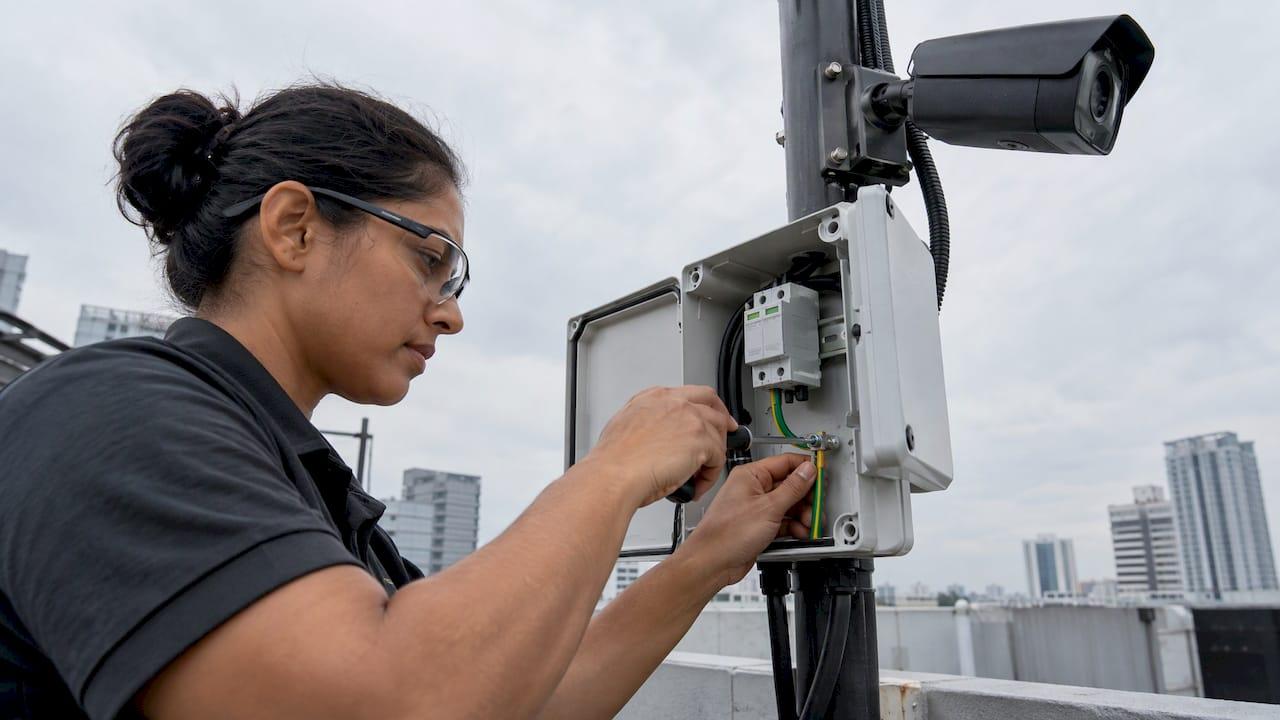
Surge Protection for CCTV: A Singapore Installer's Guide

CCTV surge protection means fitting surge protective devices (SPDs) on every conductive line that enters or leaves a camera, switch or recorder: mains power, PoE Ethernet, coaxial video and RS485 control. Fit them at each boundary where the cable crosses from an exposed area to a protected one, and bond them to a short, low-impedance earth. Singapore has frequent lightning, so a camera system without this protection is a recurring repair bill.
This guide is for integrators, facility managers and security teams who specify or maintain camera systems. It covers where the risk comes from, which circuits to protect, where the devices go, which ratings to check and how earthing decides whether any of it works.
TL;DR
- Protect each conductive circuit separately: AC power, PoE or Ethernet, BNC video and RS485 control. One generic device does not cover unrelated interfaces.
- Plan protection at boundaries: at the camera, at the pole-base box, and where cable enters the building or reaches the switch or recorder.
- Check the standards: outdoor AC SPDs to IEC 61643-11 with at least 10 kA nominal discharge current, and signal SPDs to IEC 61643-21.
- Earthing decides performance. Bond to one earth terminal with the shortest possible leads.
- Count circuits, not cameras, when you write the bill of materials.
Table of Contents
- Why Singapore CCTV needs surge protection
- Which CCTV circuits need protection
- Where to install surge protection
- Lightning protection zones in plain terms
- Ratings and standards to check
- Earthing and bonding decide the outcome
- A worked example: a carpark with ten pole cameras
- Keep protection working over time
- Our perspective
- Plan resilient CCTV with BeyondSensor
- FAQ
- Sources
Why Singapore CCTV needs surge protection
Singapore sits among the most lightning-active places in the world. The Meteorological Service Singapore reports about 176 lightning days a year, with the inter-monsoon months producing more than half of all strikes. A camera network is a field of long metallic cables strung across car parks, rooftops, perimeter fences and poles. Each cable acts as an antenna for any nearby strike.
Damage does not require a direct hit. ITU-T Recommendation K.142 names both direct lightning and induced lightning as key sources of damage to video surveillance systems. It also says the need for protection depends on the installation environment under IEC 62305-2, the local lightning ground flash density, the lightning protection zone, and the type, length and exposure of both power and signal cables.
In practice, the most exposed installations are:
- Pole-mounted cameras on perimeters, carparks and open ground.
- Rooftop and tower-mounted cameras that stand higher than their surroundings.
- Long cable runs between buildings, such as a camera at a gate house feeding a switch in a separate block.
- Sites with no external lightning protection system, where the building offers no shielding to the cabling.
Singapore also has its own code of practice. SS 555 is the national standard for protection against lightning, and Part 4 covers electrical and electronic systems within structures. It is the adoption of IEC 62305-4, which is the reference for the zone concept used below. Ask the project's lightning protection or electrical consultant how the site's risk assessment applies to the camera system.
Which CCTV circuits need protection
A camera is not one connection. It is usually several, and each can carry a surge in.
| Circuit | Typical use | What the SPD must match |
|---|---|---|
| AC mains (3-pole) | Powering cameras, power supply boxes, recorders | Mains voltage, discharge current, IEC 61643-11 |
| Low-voltage DC | Cameras powered from a local supply | Working voltage and current of the camera |
| PoE Ethernet (RJ45) | IP cameras: data, video and power on one cable | Ethernet category, PoE power class, data rate |
| Coaxial BNC | Analog and HD-over-coax video | Video bandwidth, impedance |
| RS485 twisted pair | Pan, tilt and zoom control | Signal voltage, data rate |
Manufacturers' guides describe the same layout. OBO Bettermann's CCTV brochure notes that structures differ by transmission medium: coaxial BNC video, RS485 for PTZ control, and power over a three-pole cable. It adds that modern IP cameras with one RJ45 connection carry data, video and power via PoE. DEHN's CCTV paper explains that coaxial video is an unbalanced transmission where the shield is the signal reference, so a surge on the shield becomes noise or damage on the signal itself.
The practical rule comes from a pole-protection guide by an SPD maker: select the SPD for each conductive circuit on the pole, and do not assume a generic device protects unrelated interfaces. It also advises counting conductive circuits rather than only cameras when you procure. A single pole with a PoE camera, a separate DC-powered illuminator and an RS485 PTZ head has three circuits to protect, not one.
PoE: protect both ends
PoE makes wiring simple but concentrates risk. The same cable carries data and power, so one surge can damage the camera port, the switch port and the PoE power circuit together. The device used must suit the cable category and the PoE power class, otherwise it can degrade the link or fail under load.
OBO's brochure ties the choice of product to the lightning protection zone. Its ND-CAT6/E-B can be used in zones 0B to 1, and its ND-CAT6/E-F must be used for zones 1 to 3. The point for integrators: the zone drives the product class, so identify the zone before you order.
Before you add PoE protection, confirm the load is within budget. Our PoE Power Budget Calculator helps you check switch capacity against camera, heater and PTZ draw. Cable choice is a related decision, and the comparison of Cat6 vs Cat6a cabling is a useful reference when you specify long PoE runs.

Where to install surge protection
At the camera and on the pole
For front-end equipment on an outdoor pole, ITU-T K.142 says an appropriate SPD set is needed to protect against direct strikes. It specifies that a camera with a holder should have a multi-service SPD protecting the power line, control signal and AV signal. A camera without a holder should have one protecting the power line and AV signal.
The pole-protection guide mentioned above recommends evaluating three boundaries:
- Close to the camera.
- Inside the pole-base junction box.
- Before the outdoor cable reaches the remote equipment, such as a switch or recorder.
It also makes a point that is easy to miss: a camera-side SPD does not automatically protect the remote switch, and the reverse is also true. Required locations depend on cable routing, exposure, lightning protection zones, bonding and the project risk assessment, so treat the three boundaries as the starting checklist, not a universal prescription.
At the building entry point
Phoenix Contact's video surveillance info paper advises protecting every line routed from the unprotected area into the protected area, installed directly at the building entry point. For lines carrying lightning current, it names IEC test classification T1 (type 1 SPD) for power lines and D1 for data lines. It also states that surge protection for power supplies at the feed point of the electrical system, the main distribution, is necessary and often mandatory. For buildings without external lightning protection, it requires surge protection upstream of couplings from the supply network.
Coordination between stages
A coarse SPD at the building entry and a fine SPD at the camera must work as a pair. K.142 states that coordination is needed between a secondary SPD at the front end and any primary SPD installed upstream, on signal lines (IEC 61643-22) and on power lines (IEC 61643-12). Buying devices from different sources without checking this can leave the fine stage taking energy it was never meant to handle.
Lightning protection zones in plain terms
The zone concept from IEC 62305 is the logic behind where the devices go. The Phoenix Contact paper describes the outer zones this way:
- LPZ 0A: exposed to direct strikes and the full lightning electromagnetic field.
- LPZ 0B: protected against direct strikes, but still exposed to the full electromagnetic field.
- Inner zones: progressively lower exposure as you move inside the structure.
The paper states that every line crossing from one zone to the next must be protected by SPDs, with performance described by IEC test classifications. A camera on a pole beyond any air terminal is in an outer zone. The cable that runs to a comms room crosses at least one boundary, and each crossing is a place for a device.
This changes how you read a site drawing. Mark each cable, mark each zone it crosses, and you have your SPD schedule.
Ratings and standards to check
Before you approve a product on a submittal, check these against the equipment it protects:
- AC SPDs outdoors: K.142 says they should comply with IEC 61643-11 and have a minimum nominal discharge current of 10 kA.
- Protection level: the AC SPD's protection level should be lower than the resistibility of the equipment's AC power ports.
- Signal SPDs: they should comply with IEC 61643-21, with a protection level below the signal port's resistibility.
- Interface match: connector type, bandwidth, PoE class and working voltage must match the circuit. A video SPD that adds loss to a coax run is a fault you created.
- Zone and test class: the device must suit the zone it sits in, as in the PoE example above.
- Local rules: SS 555 and the project's electrical and lightning protection design set the site requirements. Confirm them with the consultant or licensed electrical worker responsible for the installation.
Earthing and bonding decide the outcome
An SPD only diverts a surge. Where it goes depends on the earth connection. MTL's earthing guide for surge protection recommends bonding incoming services, including video, to one earth terminal, preferably at the main distribution board, using the shortest possible bond cables. It recommends fitting SPDs on incoming cables close to that terminal and bonding them with the shortest possible cable, with a minimum cross-section of 2.5 mm². If you own the entire cable link, fit another SPD at the remote end.

For exposed pole sites, a common engineering approach is a lightning rod with the camera inside its protection angle, the camera close to its network box, and both bonded to the nearest earthing point. Whether the site needs a rod is a question for the lightning protection design, not the camera installer alone.
Two habits cause most field failures:
- Long earth leads. Every extra metre adds impedance, and the surge voltage at the equipment rises with it.
- Separate earths with no bonding. Different earth references between a camera and its switch can create a voltage difference between them during a strike.
A worked example: a carpark with ten pole cameras
Consider a site with ten pole-mounted PoE cameras, each fed by a cable run back to an indoor switch, plus one RS485 PTZ dome.
- Count circuits. Ten PoE links, one RS485 line, one DC supply for a pole light, and the mains feed into the comms room: thirteen circuits crossing zones.
- Mark zones. Poles are in an outer zone. The comms room is inside the structure.
- Place devices. A PoE SPD at each camera end, a matching device at the switch end, an RS485 device at both ends of the PTZ line, and an AC SPD at the main distribution board plus a coordinated one at the comms room rack.
- Bond. One earth bar in the comms room, short bonds from every device to it, and a bonded earth at each pole.
- Record. Photograph the installed devices, label them, and add them to the preventive maintenance schedule.
The bill of materials now reflects circuits, which is what the cable-by-cable guidance above asks for.
Keep protection working over time
SPDs wear out. They absorb surges, and many indicate their end of life with a status window or a remote contact. Add them to routine inspections alongside lens cleaning and housing seals. Our preventive maintenance guide for CCTV in Singapore shows how to build that into a service plan. Where a site cannot afford downtime, redundant communications paths reduce the effect when a link or switch does fail, and our guide to secure camera networking covers the wider hardening steps for installers.
Our perspective
Most surge damage we see discussed in the field is not caused by a missing product. It comes from a missing plan. A camera network is a system, and the protection has to be designed like one: circuits counted, zones marked, devices coordinated, earthing short and documented.
That is why we treat protection as part of deployment planning, not as an accessory added at handover. When we work with integrators on Solution Integration, the cable routes, power budgets and exposure of each pole are reviewed before hardware is chosen. A clean design lets an intelligent platform do its job: AI-driven video analytics and exception-based monitoring only work if the cameras stay online through a Singapore storm season.
Our approach is built on multi-vendor integration and localized technical validation across Southeast Asia, so the protection scheme can be matched to the site and the equipment on it. Resilient hardware at the edge is what lets automation at the top deliver on its promise.
Eumir
Plan resilient CCTV with BeyondSensor
If you are specifying a camera network for a facility in Singapore, we can help you plan it so that analytics, patrol and visitor workflows stay available. Our Solution Integration service supports integrators and solution providers with multi-vendor deployment planning, and BeyondWatch brings AI-powered video analytics to the cameras you protect.

Integrators who want to work with us on regional projects can start on our system integrators page.
FAQ
Do PoE cameras need surge protection?
Yes, when the cable is exposed or leaves the building. The PoE cable carries data, video and power, so a surge can reach the camera and the switch. Protect both ends with devices that match the cable category and PoE class, and select them by lightning protection zone.
Does a surge protector on the switch protect the camera?
Not by itself. A device at one end does not automatically protect equipment at the other, and the pole-side and switch-side terminations should be planned together. Fit protection at the camera or pole-base box as well, and coordinate the stages.
Is a plug-in surge strip enough for a CCTV recorder?
A power strip addresses only the mains input. Cameras also have video, PoE or control lines that can carry a surge. For a site with exposed cabling, protect mains at the distribution board and every signal line at the boundary it crosses.
What discharge rating should outdoor AC SPDs have?
ITU-T K.142 says outdoor AC SPDs should comply with IEC 61643-11 and have a minimum nominal discharge current of 10 kA. The protection level should also sit below the resistibility of the equipment's power ports. The site's lightning risk assessment may require more.
Who decides where SPDs go on a Singapore site?
The design follows the building's lightning protection and electrical design under SS 555 and the risk assessment. Work with the project's lightning protection or electrical consultant and a licensed electrical worker, and record the final locations.
Sources
- ITU-T Rec. K.142 (11/2019), Lightning protection and earthing for video surveillance
- Why does Singapore experience lightning on 176 days a year?
- SS 555 Part 4: 2018, Protection against lightning
- Surge protection for closed-circuit television systems (OBO Bettermann)
- CCTV white paper WP007 (DEHN)
- Outdoor CCTV Pole Surge Protection and SPD Placement
- Easy protection: Protection for video surveillance systems (Phoenix Contact)
- Earthing guide for surge protection (MTL)
- Cat6 vs Cat6a: Which Cable to Specify in Your Office
Recommended
Read More Articles
Audit Log Retention in Singapore: Periods, Rules and Setup
How long to keep audit logs and security audit trails in Singapore: CII 12 months, CCTV 31 days, the seven-year myth, data residency and a setup checklist.
Smart Lamppost Monitoring in Singapore: How It Works
How smart lamppost and streetlight monitoring works in Singapore: sensors, fault alerts, data governance, deployment checks and measured results from LTA and GovTech.

Contactless Visitor Check-In: A Practical Guide for Singapore Sites
How contactless visitor check-in works, which methods suit your site, and how to roll it out in Singapore with PDPA, access control and contractors in mind.
Visitor Management Policy: What to Include for Singapore Sites
Build a visitor management policy for a Singapore workplace: scope, check-in rules, PDPA and NRIC limits, retention, escorts, emergencies and review.
Let's Build YourSecurity Ecosystem.
Whether you're a System Integrator, Solution Provider, or an End-User looking for trusted advisory, our team is ready to help you navigate the BeyondSensor landscape.
Direct Advisory
Connect with our regional experts for tailored solutioning.