
Open Standards, Edge Resilient Access Control: 5 Steps for Integrators
Five practical steps for security integrators to build open standards, edge resilient access control systems and avoid costly rework.

Open Standards, Edge Resilient Access Control: 5 Steps for Integrators

Access control integration connects door hardware, video, alarms, and visitor systems into one operating picture, so a single event triggers coordinated action instead of a scramble across disconnected panels. The payoff is faster incident response and less manual reconciliation. Security integrators and facility managers should own this work directly, because the design choices made early determine whether the system scales or becomes a liability later.
TL;DR:
- Integrating access control with video, alarms, and building management enables faster incident response, automatic containment, and streamlined audits, especially at scale.
- Using open standards like OSDP, BACnet, MQTT, and RESTful APIs from the start ensures long-term compatibility and reduces costly rework.
- Deploying local controllers with cloud analytics balances security resilience and operational visibility during network outages.
- Proper planning, staged testing, and regulatory compliance considerations are crucial for a successful and sustainable integration project.
- Edge processing and network segmentation are vital for security and system reliability, preventing common vulnerabilities and operational disruptions.
Table of Contents
- What Access Control Integration Actually Delivers
- Common Integrations and What Each One Adds
- 1. Video surveillance and VMS
- 2. Visitor management
- 3. Alarms and intrusion detection
- 4. Building management systems
- 5. Time and attendance / HR systems
- 6. Intercoms, elevators, and IoT sensors
- Technical Best Practices That Prevent Costly Rework
- A Step-by-Step Implementation Checklist
- Keeping an Integration Reliable After Launch
- What Field Deployments Teach You That Documentation Doesn't
- Where Integrations Break: Vulnerabilities Worth Taking Seriously
- Compliance Rules That Shape How You Build the Integration
- Scaling an Integration Across Multiple Sites
- How Integration Changes the Day-to-Day User Experience
- Real-World Patterns That Separate Success From Failure
- The Part of This Process Most Teams Get Backwards
- Get Integration Support From Beyondsensor's System Integrator Team
- Sources
What Access Control Integration Actually Delivers
The strongest argument for integrating access control isn't convenience. It's the compounding value of shared context across systems that used to operate in silos.
Linking a badge swipe to a camera feed means an operator doesn't just know that a door opened, they know who opened it, what the video shows, and whether an alarm fired in the same window. That kind of correlation used to require pulling logs from three different consoles after the fact. Now it happens automatically, and access control integrations commonly link access events to video, alarms, and building management so one trigger produces a coordinated response across all three.
The operational benefits stack up fast:
- Faster incident response: correlated video and access logs cut investigation time from hours to minutes.
- Fewer manual errors: automated credential revocation and visitor expiration remove the human step that most often gets forgotten.
- Easier audits: consolidated logs replace the spreadsheet reconciliation that used to eat a compliance officer's week.
- Lower long-term cost: open architectures avoid the vendor lock-in that turns a five-year-old system into a forklift upgrade.
Pro Tip: Run a 90-day log audit before any integration project. If your access and video logs don't already share a common timestamp format, fix that first. It's the cheapest problem you'll ever solve and the most expensive one to ignore.
Facility teams that have gone through this transition report a similar pattern: the first month feels like extra setup work, and every month after that feels like the manual process should never have existed. Beyondsensor's own work with integrated security systems for facilities tracks that same curve, where the return shows up in reduced staff hours rather than a single dramatic event.
Common Integrations and What Each One Adds
Not every system deserves equal priority. Some integrations return value on day one; others matter mostly at scale. Here's the order that tends to make sense for most facilities.
1. Video surveillance and VMS
This is almost always the first integration, and for good reason. Pairing access events with camera feeds gives operators automated tagging and forensic playback tied directly to a door event. Platforms like Axis's door integration approach show how unifying video and door control in one interface speeds up both live monitoring and after-the-fact investigation, since operators no longer toggle between two separate applications to answer one question.
2. Visitor management
Automated badge issuance and expiration close a gap that manual sign-in sheets never solved. Once a visitor's scheduled window ends, their credential deactivates without anyone remembering to walk over and pull it.
3. Alarms and intrusion detection
Coordinated lockdowns, where a single alarm event locks a zone of doors instead of one, turn a slow manual response into an automatic containment action.
4. Building management systems
HVAC and lighting tied to occupancy data cut energy costs on schedule alone, since empty floors don't need full climate control.
5. Time and attendance / HR systems
Credential lifecycle syncing with HR records means a terminated employee's badge deactivates the moment HR processes the exit, not whenever security gets around to it. Some sectors push this further: construction sites now tie worker identity and training records to access decisions, gating door access behind compliance status rather than just identity.
6. Intercoms, elevators, and IoT sensors
These integrations matter most in high-rise or multi-tenant buildings, where elevator dispatch and intercom routing need to respect the same access rules as the doors themselves.
Technical Best Practices That Prevent Costly Rework
Most failed integration projects don't fail on day one. They fail eighteen months in, when a vendor discontinues a proprietary protocol and the whole system needs replacing. The fix is choosing standards over proprietary shortcuts from the start.
- Use OSDP for reader communications. It encrypts the connection between reader and controller, closing a gap that older Wiegand wiring leaves wide open.
- Use BACnet for BMS integration. It's the accepted language for HVAC and lighting systems, so you're not stuck writing custom drivers for every building automation vendor.
- Use MQTT for IoT messaging. Lightweight and built for unreliable networks, it fits sensor fleets better than heavier protocols.
- Use RESTful APIs for application-layer integration. Nearly every modern VMS, visitor system, and analytics platform exposes one, which is what makes cross-vendor integration realistic at all.
Open architecture in access control relies on these standards precisely because they let controllers, readers, and building systems from different vendors speak the same language without a custom middleware layer for every pairing. But open architecture only means something when it's backed by verified SDKs and signed firmware; a vendor that calls its system "open" while withholding documentation is selling marketing, not interoperability.
Edge processing deserves its own rule: mission-critical door decisions, unlock or deny, should never depend on a live cloud connection. Push analytics and aggregation to the cloud, but keep the decision that matters most at the door controller itself. Design your event architecture around message queues, consistent timestamps, and idempotent events, so a network hiccup doesn't produce duplicate or lost records. And document every SDK and firmware dependency in your deployment plan; a version mismatch discovered during a rollout is far more expensive than one caught during planning.
A Step-by-Step Implementation Checklist
Skipping the planning phase is the single most common reason integration projects run over budget. Successful projects treat testing, documentation, and training as part of deployment, not as an afterthought once the hardware is live.
- Inventory every asset. Map doors, readers, cameras, and the teams responsible for each, before touching a single configuration screen.
- Run a compatibility and gap analysis. Check protocol support, SDK availability, and whether each system runs cloud, on-prem, or hybrid.
- Define automation rules and escalation paths. Decide exactly what happens when a door forces open after hours, and who gets notified in what order.
- Set acceptance criteria up front. Know what "done" looks like before you start building, not after.
- Build a staged test plan. Start at the device level, move to system integration tests, then a limited pilot, then full user acceptance testing.
For the rollout itself:
- Deploy in stages, one building or zone at a time, never the whole site at once.
- Keep a documented rollback procedure ready before go-live, not written after something breaks.
- Train operations staff on the new workflows before handover, not during it.
- Treat the migration as staged modernization. Integrators should support hybrid deployments and phased upgrades so legacy systems keep functioning while the new architecture comes online.
Beyondsensor's physical security integration guide walks through this staging process in more granular detail if you're building your first project plan from scratch.
Keeping an Integration Reliable After Launch
Deployment day is the easy part. Keeping the system healthy for years is where most operational budgets actually go.
Patching windows and change control need to be scheduled, not reactive. Firmware updates should be validated in a test environment before touching production doors. Monitor event volumes and tune alert thresholds regularly. A system throwing 200 false alarms a week trains operators to ignore real ones.
- Design local decision making at every controller so a network outage never locks legitimate users out.
- Segment the network so a compromised camera can't reach the access control database.
- Review credential access rights on a fixed schedule and automate revocation the moment someone leaves.
- Set clear SLAs with every vendor and run a tabletop exercise at least once a year.
Edge-enabled controllers reduce latency and maintain continuity during network interruptions, which is exactly why a hybrid cloud-and-edge model outperforms a fully centralized one for anything mission-critical. Redundancy isn't a luxury add-on here. It's the difference between a five-minute network blip and a building full of locked-out employees.
What Field Deployments Teach You That Documentation Doesn't
Integration work looks clean on a whiteboard and gets messy the moment real hardware, real network conditions, and real staff turnover enter the picture. Beyondsensor's integration teams work across Singapore, Malaysia, and the Philippines, with offices opening in Thailand and Vietnam, combining sensor hardware, surveillance software, and ecosystem matchmaking so integrators aren't stuck reconciling five vendor SDKs on their own.
A pattern that shows up repeatedly in recent deployments: hybrid architectures that keep door decisions on local controllers while pushing video analytics and cross-site reporting to the cloud. That split handles the two failure modes that matter most, network outages and cloud service disruptions, without sacrificing centralized visibility. The most common pitfall isn't hardware failure. It's skipping the compatibility audit and discovering a protocol mismatch three weeks into a rollout.
Where Integrations Break: Vulnerabilities Worth Taking Seriously
Every integration point is also an attack surface, and the most common vulnerabilities aren't exotic. They're mundane oversights that get exploited precisely because nobody expects them.
Unencrypted reader-to-controller communication is still common on legacy Wiegand installations, and it lets an attacker capture and replay credentials with cheap, widely available hardware. Default credentials on IoT sensors and edge devices get shipped and never changed. APIs exposed for third-party integrations sometimes lack proper authentication scoping, giving a compromised visitor management system a path into the access control database itself.
The fix for most of these isn't exotic either. Segment your network so cameras and IoT sensors sit on a different VLAN than the access control server. Require signed firmware updates and reject anything unsigned. Rotate API keys on a schedule instead of treating them as permanent. Audit third-party integration permissions quarterly, because the visitor management vendor you approved two years ago may have expanded its own API footprint since then without anyone noticing.
Physical vulnerabilities matter just as much as digital ones. A reader wired without tamper detection can be pulled off the wall and bypassed at the controller level, and that risk grows as more subsystems depend on the same access decision.

Compliance Rules That Shape How You Build the Integration
Regulatory requirements aren't a checkbox at the end of a project. They determine architecture decisions from the start, especially around where data lives and who can access it.
For any facility handling European personal data, GDPR requirements mean access logs, which contain names, timestamps, and movement patterns, count as personal data subject to retention limits and subject-access requests. That has a direct technical consequence: your system needs a way to export or delete an individual's access history on request, which most legacy platforms were never built to do.
Healthcare facilities face a parallel constraint under HIPAA in the US, where areas containing protected health information need documented, auditable access controls, and integration logs become part of the compliance record during an audit. Even outside those specific frameworks, most jurisdictions now expect some form of data minimization: collect only what the security use case actually requires, and set retention periods rather than storing access logs indefinitely by default.
The practical takeaway for integrators: build data retention rules and export capability into the system architecture during design, not as a patch after a compliance officer asks for it. A facility manager should also confirm which regulatory framework actually applies before assuming a generic global policy is safe. Requirements shift meaningfully by sector, healthcare, finance, and government all carry additional layers, and by the jurisdiction where the facility physically operates.
Scaling an Integration Across Multiple Sites
A single-building deployment and a fifty-site rollout are different engineering problems, not the same problem at a bigger size. The failure modes that stay invisible at one location become obvious at ten.
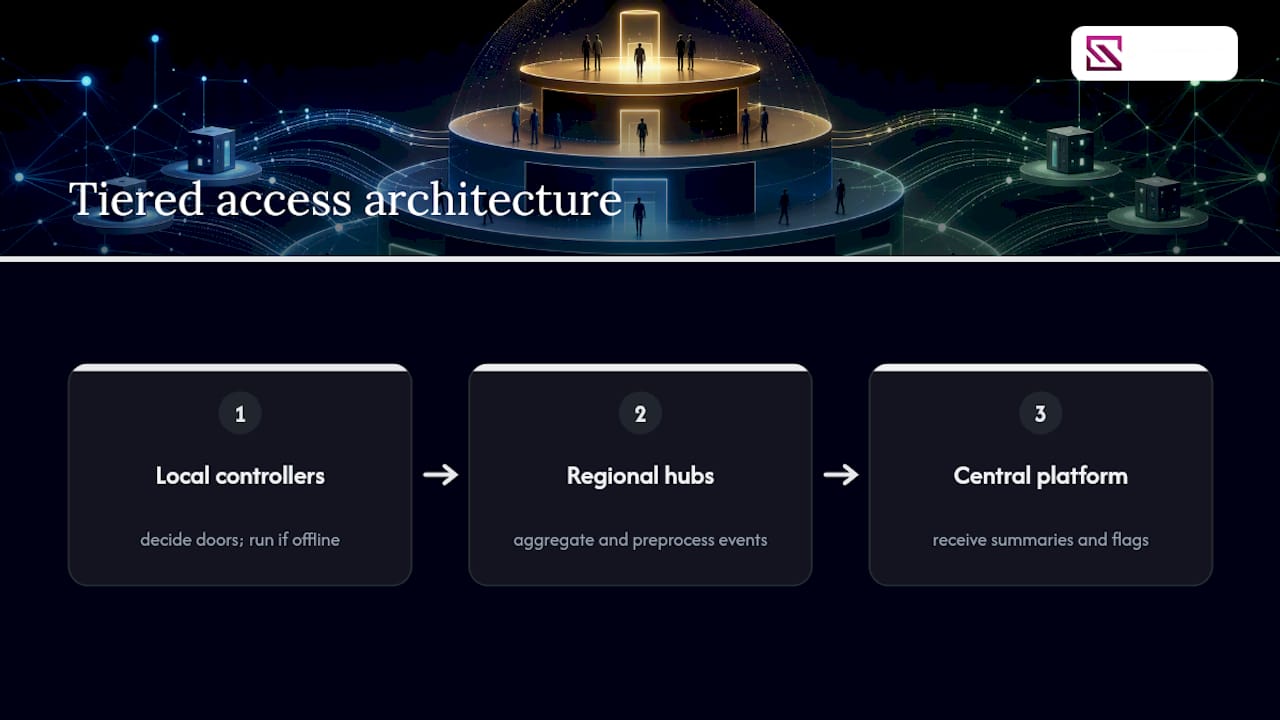
Centralized management platforms start to strain under event volume once you're aggregating logs from dozens of sites simultaneously. The fix usually involves a tiered architecture: local controllers handle door decisions independently, regional hubs aggregate and pre-process events, and only summarized or flagged data flows up to the central platform. That structure keeps bandwidth manageable and keeps individual sites functional even if the central connection drops.
Credential management gets harder at scale too. A single access policy rarely fits every site once you're spanning multiple countries, each with different regulatory requirements and different local risk profiles. Role-based access control, where permissions attach to a role rather than to hundreds of individually configured accounts, becomes close to mandatory once you pass a few hundred users.
Vendor consistency matters more than it seems at first. Standardizing on open protocols like OSDP and RESTful APIs across every site means a hardware swap at one location doesn't require rebuilding the integration logic for that site alone. Facilities that skip this step often end up running three or four incompatible sub-systems within the same organization, each requiring separate maintenance contracts and separate operator training. That's the scaling cost nobody budgets for until it's already happened.
How Integration Changes the Day-to-Day User Experience
The best integration is the one your security operators barely notice, because it removes steps rather than adding them. That's a harder design goal than it sounds.
Operators managing an integrated system should see one dashboard, not four. When a door alarm fires alongside a video alert and a visitor overstay notice, those three events need to appear as a single correlated incident rather than three separate pop-ups competing for attention. Poorly integrated systems do the opposite: they add screens instead of removing them, and operator fatigue climbs as a result.
Customization options matter here more than most vendors admit. A hospital security desk and a corporate office lobby need different alert thresholds, different escalation chains, and different default views, even if they're running the same underlying platform. Configurable rule engines, where an integrator can adjust automation logic without waiting on a vendor's development team, separate systems that actually get used from ones that get worked around.
End users outside the security team feel the integration too. Employees notice when a badge works consistently across a parking garage, a lobby turnstile, and an elevator, instead of requiring three separate credentials. Visitors notice when their access expires automatically instead of requiring a manual walk-back from the front desk. Good integration design treats those small frictions as seriously as it treats the security architecture itself, because a system that annoys the people using it daily eventually gets bypassed, propped doors and shared badges being the two most common workarounds.
Real-World Patterns That Separate Success From Failure
The projects that go well share a common thread: they treat integration as an ongoing operational discipline rather than a one-time installation event.
A mid-sized office campus consolidating three legacy access systems into one platform typically sees the clearest early win in audit time. What used to require pulling logs from three separate consoles and manually cross-referencing timestamps becomes a single report generated in minutes. That's not a dramatic security event. It's a quiet, compounding efficiency gain that shows up every month rather than once.
Healthcare facilities integrating access control with HR and training records illustrate a different pattern: compliance gating built directly into the door decision. A staff member without current certification simply can't badge into a restricted area, because the access decision checks the HR record in real time rather than relying on a security officer remembering to check. Construction sites use a similar model, tying worker identity and training status to physical access, which turns a compliance requirement into an automated gate instead of a manual audit.
The pattern that shows up in nearly every successful deployment: the organizations that ran a staged pilot before full rollout caught their configuration mistakes on one floor instead of across an entire building. The ones that skipped piloting entirely tended to discover their mistakes from an angry building tenant instead.
The Part of This Process Most Teams Get Backwards
Most integration advice leads with features, cameras that talk to doors, dashboards that show everything in one place, and treats standards compliance as a technical footnote. That ordering is backwards. The projects that hold up five years later are the ones that picked OSDP, BACnet, and RESTful APIs on day one, even when a proprietary shortcut looked faster at the time.
The conventional wisdom also underrates edge processing, mostly because cloud dashboards demo better than a controller quietly making its own decisions offline. But the demo isn't the deployment. A cloud outage that locks every door in a building is a design failure, not bad luck, and it's entirely preventable with the right architecture from the start.
If there's one priority worth putting ahead of everything else, it's this: run the compatibility audit and the staged pilot before committing to any platform. Integrators who skip that step aren't saving time. They're deferring the cost to a rollback nobody planned for, at a moment when the building is already depending on the system working.
— Eumir
Get Integration Support From Beyondsensor's System Integrator Team
Beyondsensor is built for exactly the work this article covers: combining sensor hardware, AI-powered surveillance software, and unified security dashboards so integrators aren't stitching together five incompatible vendor SDKs on their own.

The company's regional footprint across Singapore, Malaysia, and the Philippines, with Thailand and Vietnam offices coming online, means integration projects get local validation instead of a generic global playbook applied blind to local network conditions and regulatory requirements. That combined hardware-software approach also means fewer handoff gaps between the sensor layer and the software making decisions on top of it, which is usually where integration projects lose the most time. If you're planning a deployment and want a technical partner who understands both the edge hardware and the platform layer, visit the system integrators page to start a conversation about your project scope and regional requirements.
Sources
For deeper technical grounding, review OSDP and open architecture standards, access-to-VMS integration patterns, and Beyondsensor's own guide on smart facility integration.
- How Access Control Integrates With CCTV and Alarms
- Access Control Integration: Key Strategies for Security Integrators
Recommended
Read More Articles

Privacy Masking for CCTV in Singapore: Setup and PDPA Guide
How to set up privacy masking on CCTV in Singapore: static vs AI masks, PDPA access-request rules, a step-by-step setup and common mistakes to avoid.

Line Crossing Detection: How Virtual Tripwires Work
How line crossing detection works, where it beats motion alerts, how to place and tune a virtual tripwire, and what Singapore's PDPA expects from you.

Geofencing Alerts for Site Security: Setup Guide for Singapore
How to design geofencing alerts that flag real security events, cut alert fatigue and stay within PDPA and IPA rules at Singapore sites.

CCTV Operator Training in Singapore: Skills, Courses and Costs
What CCTV operator training involves in Singapore: the PRSF course, fees and subsidies, the 31 December 2026 deadline, and skills for AI-assisted control rooms.
Let's Build YourSecurity Ecosystem.
Whether you're a System Integrator, Solution Provider, or an End-User looking for trusted advisory, our team is ready to help you navigate the BeyondSensor landscape.
Direct Advisory
Connect with our regional experts for tailored solutioning.