
How abandoned object detection works, how it tells an unattended bag from a paused one, how it differs from loitering detection, and what to check in Singapore.
Abandoned Object Detection: How It Works and How to Deploy It

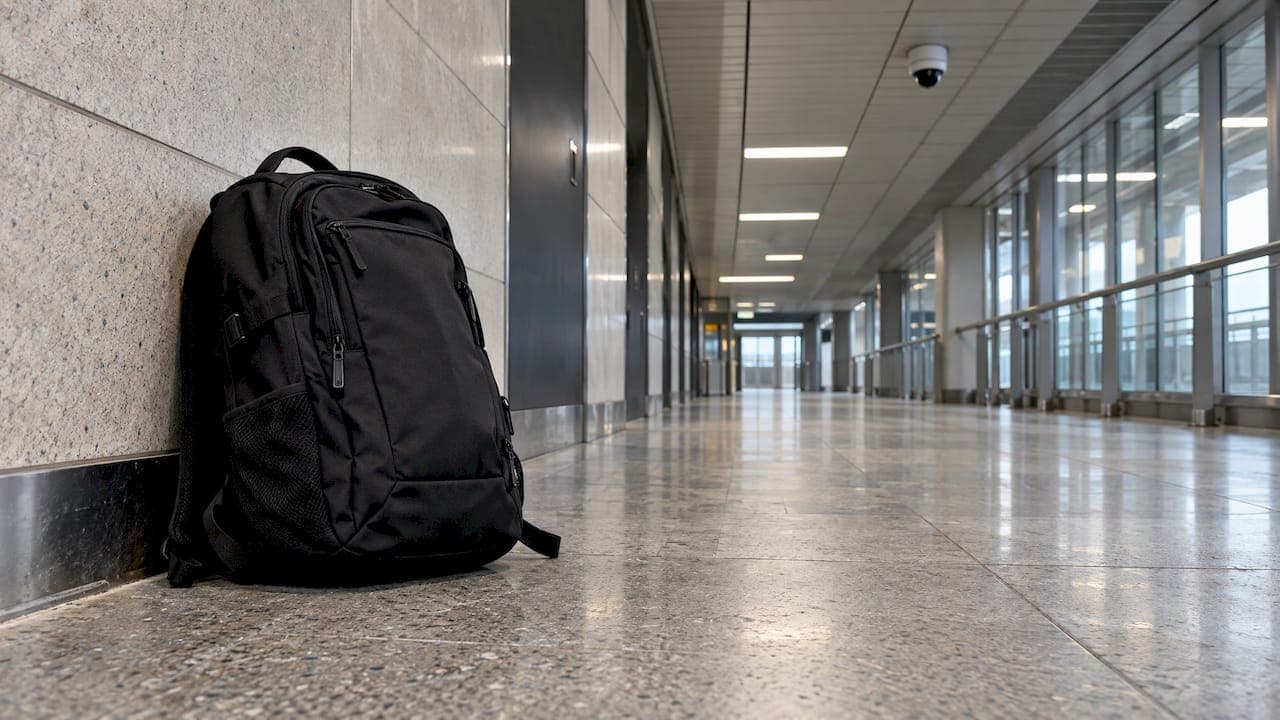
Abandoned object detection is a video analytics function that flags an item left stationary in a camera view after its owner has moved away. The system raises an alert to the operator only when two conditions hold together: the object has stayed still beyond a set time, and no person is close enough to count as its owner. This guide explains the logic behind that rule, where it breaks down, how it differs from loitering detection, and what Singapore security teams should check before they deploy it.
TL;DR
- Abandoned object detection combines a time rule (the item stays still for, say, 30 or 60 seconds) with a distance rule (no owner within roughly 3 m or three object widths).
- Crowds, occlusion and lighting changes are the main sources of false alarms. Tuned dwell times, clean camera views and human review of every alert keep them manageable.
- Loitering detection watches people who linger in a zone. Abandoned object detection watches items that stay behind. Many sites run both rules on the same cameras.
- In Singapore, the Singapore Police Force's video surveillance standard names unattended-object alerts as a way to support operators who watch many cameras.
- Rules are only as good as the deployment plan: camera placement, zone design, alert routing and operator workflow.
Table of Contents
- What abandoned object detection actually does
- How the system decides an item is unattended
- Unattended baggage versus a temporarily stationary item
- Where it struggles, and how to reduce false alarms
- Abandoned object detection versus loitering detection
- Deployment in Singapore
- Our perspective
- How BeyondSensor can help
- FAQ
- Sources
What abandoned object detection actually does
Standard motion analytics looks for things that move. Abandoned object detection looks for something that used to move and then stopped, then checks whether anyone is still attached to it.
A peer-reviewed survey of abandoned object detection in video surveillance describes a typical pipeline in four stages:
- Foreground segmentation. The system separates moving regions from the static background.
- Stationary-object detection. It identifies foreground regions that have stopped moving.
- Candidate generation. It proposes which of those stationary regions could be abandoned items.
- Candidate validation. It rejects false candidates such as illumination changes, objects that were removed rather than left, and items still attended by people nearby.
The last stage matters most in practice. A raw "something stopped moving" signal would fire constantly in a station concourse. Validation is what turns it into an alert an operator can act on.
Left-behind and removed objects
The same logic can run in reverse. An object that was in the scene and then disappears is a removed object, relevant for displays, equipment rooms and asset protection. The survey treats both under one family of methods, because both rely on comparing the current scene with a background model.
How the system decides an item is unattended
The core of the decision is two rules working together.
According to the same survey, a temporal rule flags an object that remains stationary for an application-defined period, often 30 or 60 seconds. A spatial rule defines it as unattended when no owner is within a proximity zone, modelled as a circle or ellipse and commonly set at about three object widths or 3 metres.
A 2025 paper on real-time detection of abandoned luggage describes the owner logic clearly. The system tracks the person first associated with a bag. While that person stays inside the association radius, the bag is treated as supervised. The bag is classified as abandoned only once everyone who was near it has left the radius and the dwell threshold has passed.

A worked example
Imagine a rule of 60 seconds and 3 m on a camera covering a lift lobby:
| Moment | What the camera sees | System state |
|---|---|---|
| 0 s | A visitor sets a bag down and stays beside it | Bag stationary, owner inside 3 m: supervised |
| 40 s | The visitor walks to the notice board 5 m away | Owner outside radius: dwell timer starts |
| 100 s | Bag still stationary, no person within 3 m | Threshold exceeded: alert raised |
| 70 s (alternative) | The visitor returns and picks the bag up | Timer resets, no alert |
The numbers are illustrative. The point is that both conditions must hold at once, and that each site should set them to match how people actually behave there.
How researchers build the detector
Researchers at NTU in Singapore published a pixel-based finite-state machine approach. It models the background, uses a state machine to find stationary candidates, runs an SSD deep-learning detector to find people and suspected backpacks or handbags, and then checks whether a person is nearby. Their reported rules used 30 seconds and a 3-metre owner-distance threshold.

This hybrid pattern, classical background modelling plus a neural detector, is common because each covers the other's weakness. Background modelling is cheap and reliable at spotting that something is new and still. Deep learning is better at saying what it is and who is standing beside it. A 2025 study in the journal Zhuzao/Foundry reports that combining YOLOv8n with classical computer vision reached over 25 frames per second with precision above 0.65 in challenging scenes such as crowds. That tracks people and luggage, marks luggage abandoned when it stays unassociated past the time threshold, then triggers a visual warning or alarm and logs the event.
Unattended baggage versus a temporarily stationary item
The query "unattended baggage detection" usually comes from the same worry: how does the system avoid shouting about every bag on the floor?
Three design choices do the work:
- Owner association. The system remembers who the object belonged to, not only that someone is somewhere in the frame.
- Dwell time. A traveler who puts a bag down to tie a shoe should not trigger anything. A time threshold absorbs that.
- Object class filtering. Restricting alerts to bag-like classes and a minimum size keeps litter, shadows and signage from becoming candidates.
The threshold values are the main tuning lever. A short dwell time catches more genuine events and more nuisance alerts. A long one is quieter but gives the response team less lead time. Teams usually pick different values for different zones: tight in a lobby entrance, more generous in a food court where people routinely put things down.
Where it struggles, and how to reduce false alarms
No analytics rule is a guarantee. The documented limits are consistent across the literature:
- Imperfect background subtraction leaves foreground fragments that can look like objects, and partial occlusion hides real ones. Research on robust detection of abandoned and removed objects points to these along with quick lighting changes as the factors that limit performance, and describes using a three-Gaussian mixture background model to adapt to light changes.
- Crowds block the line of sight to the object and to its owner at the same time.
- Depth ambiguity. A Stanford class project on surveillance scene classification found the model sometimes missed abandoned objects that sat close to another static item or were not fully visible, and it did not calculate physical distances. That is a reason to care about camera angle and calibration.
- Rule-based limits in complex scenes. A 2026 review from Ukraine suggests AI-oriented approaches may be more effective than purely rule-based ones in complex, dynamic scenes.
Practical ways to cut false alarms:
- Place cameras so the item and the surrounding floor area are visible from above, not behind a counter or a pillar.
- Draw zones that exclude permanent fixtures, queues and seating where people routinely rest bags.
- Set dwell times per zone and revisit them after the first few weeks of real alerts.
- Route each alert with a snapshot or short clip so the operator can judge it in seconds.
- Treat the alert as a prompt for human assessment. The operator decides what happens next.
Abandoned object detection versus loitering detection
The two functions are neighbors in the same analytics toolbox, and readers searching for loitering detection software often need both.
| Abandoned object detection | Loitering detection | |
|---|---|---|
| What it watches | A stationary item and its owner's distance | A person's dwell time in a defined zone |
| Trigger | Object still beyond threshold, no owner nearby | Person remains in the zone beyond threshold |
| Typical places | Lobbies, transit areas, car parks, event spaces | Restricted areas, perimeters, ATMs, building rear access |
| Main false-alarm cause | Crowds, items briefly set down | People waiting, queuing or working in the zone |
| Key tuning | Dwell time and owner radius | Zone shape and dwell time |
Both depend on tracking and a time threshold, which is why they often share the same camera views. The Singapore Police Force's Video Surveillance System Standard for buildings (March 2022) says video analytics can alert operators to unattended objects and that rules for suspicious persons or vehicle loitering should be considered alongside them, particularly where one operator monitors many cameras.
What to check when assessing loitering software
The same standard gives a sensible frame for evaluation. Ask whether the analytics can:
- program scene-specific rules, so a rule for a loading bay differs from one for a lobby;
- alert operators to loitering in prohibited areas rather than anywhere in the frame;
- work with your camera coverage and lighting, since both affect detection quality;
- fit operator workload and training, because an alert nobody has time to read adds no security.
Also check how alerts reach the operator, how events are logged, and whether the analytics layer works with the cameras and video management systems you already own.
Deployment in Singapore
Singapore has a visible track record of using this kind of analytics at scale. The Immigration & Checkpoints Authority uses real-time video analytics on more than 3,000 cameras at the Woodlands and Tuas land checkpoints to flag anomalies, including unattended baggage, with data from multiple systems and sensors brought together in a single command-and-control platform.
The retail sector has tested it too. A 2019 report from an NVIDIA AI innovation day describes smart video analytics trials at CapitaLand malls and Nex that flagged "Object Left Behind" events, with the aim of relieving staff from labor-intensive patrolling so they can focus on judgment and incident response.
For a facility owner or integrator planning a deployment, a workable sequence looks like this:
- Map the zones. List where an unattended item would matter: entrances, lift lobbies, drop-off points, loading areas, perimeter gates.
- Audit the cameras. Check angle, height, resolution and lighting at each zone. Fix the blind spots before you tune any software.
- Define the rules. Set dwell time and owner radius per zone, and add loitering rules where people-dwell is the risk.
- Design the alert path. Decide who receives which alert, what they see, and what the response procedure is. Our guide to a security monitoring workflow for facility teams covers this step.
- Pilot and tune. Run the rules live for a few weeks, review every alert, and adjust thresholds.
- Train operators. Give them clear procedures for what an alert means and what to do first.
Two of our related guides help with the surrounding decisions: intelligent alerting systems explains how to keep alert volume useful, and edge analytics covers running analytics close to the camera. For a wider overview, see smart surveillance analytics for security teams.
Our perspective
Most abandoned object projects fail on operations, not on algorithms. The detection logic is well understood: a time rule, an owner-distance rule, and validation that rejects lighting changes and attended items. What decides success is whether the right alert reaches the right person with enough context to act in seconds.
That is why we think in terms of exception-based monitoring. AI never blinks, so it can watch every camera view continuously and surface only the events that deserve a human decision. The operator keeps the judgment. The system takes over the staring.
We also believe in unified platforms over isolated rules. Unattended-object alerts, loitering alerts, patrol records and visitor data are more useful when they sit in one operational picture. Our approach combines AI-driven tools, multi-vendor integration and local technical validation, so that a deployment in Singapore, Malaysia or the Philippines reflects the conditions of the site and the compliance expectations of the market.
Our BeyondPatrol platform, with its Patrol Agent built on Vision Language Models, is designed around this idea: let AI handle routine observation, and let people respond to exceptions.
Eumir
How BeyondSensor can help
If you are planning abandoned object or loitering analytics across several sites, the hardest parts are usually integration with existing cameras, rule design per zone, and a response workflow that operators trust. We work with system integrators, facility owners and agencies on exactly these questions.

BeyondPatrol is our AI-powered patrol and monitoring product. For deployments that mix vendors and existing infrastructure, our Solution Integration service covers planning and connecting the pieces. You can also talk to our team about your site.
FAQ
What is the difference between an abandoned object and a removed object?
An abandoned object is an item that appears in the scene, stays stationary and has no owner nearby. A removed object is the reverse: something that was in the background and is no longer there. Both are detected by comparing the live view with a background model, and both appear in the research literature as related tasks.
How long should the dwell time be set?
The research commonly uses 30 or 60 seconds, with an owner radius of about 3 m or three object widths. These are starting points rather than fixed standards. Busy areas where people often set items down usually need a longer threshold than a quiet entrance.
Can the system tell a bag from other objects?
Modern systems use deep-learning detectors to classify people and bag-like items such as backpacks and handbags, then check whether a person is near. This reduces alerts from shadows, litter and fixtures. Partial occlusion and crowded views can still limit detection, so camera placement matters.
Do I need loitering detection as well?
The Singapore Police Force's standard suggests considering loitering rules alongside unattended-object alerts, especially where one operator watches many cameras. If your risk includes people lingering near restricted areas, the two rules complement each other.
Sources
- Abandoned Object Detection in Video-Surveillance: Survey and Comparison
- A System for Real-Time Detection of Abandoned Luggage
- Abandoned Object Detection Using Pixel-Based Finite State Machine and Single Shot MultiBox Detector (NTU)
- Zhuzao/Foundry, Volume 28 Issue 8 (2025)
- Robust Detection of Abandoned and Removed Objects
- CNNs for Surveillance Footage Scene Classification (Stanford CS231n)
- Detection of Abandoned Objects in Video Surveillance (2026 review)
- Singapore Police Force, Video Surveillance System Standard for Buildings
- ICA, Expansion of ICA's Role in Border Security
- Smart AI Video Analytics for Retail (NVIDIA AI Innovation Day 2019)
Recommended
Read More Articles
Bridge Monitoring Sensors: Types, Placement and Data Use
Which sensors monitor bridges, what each measures, how data reaches engineers, and how to specify a system for Singapore infrastructure and facility owners.
MQTT Security Best Practices for Singapore Deployments
A practical MQTT security checklist for Singapore teams: TLS 1.3, mutual authentication, topic ACLs, hardening, monitoring and IMDA and CSA requirements.

Preventive Maintenance for CCTV: A Singapore Guide
A practical preventive maintenance plan for CCTV in Singapore: checklist, inspection rhythm, SPF-aligned SLA terms, fault logging and what to put in a contract.
Thermal Camera Calibration: Methods, Intervals and Singapore Checks
How thermal camera calibration works, how often to do it, how to read a certificate, and what to check with Singapore labs before you rely on the readings.
Let's Build YourSecurity Ecosystem.
Whether you're a System Integrator, Solution Provider, or an End-User looking for trusted advisory, our team is ready to help you navigate the BeyondSensor landscape.
Direct Advisory
Connect with our regional experts for tailored solutioning.